

Flight simulation is one of those genres that can easily turn a casual gaming session into a full-blown hobby. One minute you’re taking a leisurely flight over the countryside, and before you know it, you’re researching aircraft, learning cockpit procedures and wondering whether your desk has enough room for another piece of specialist hardware. It’s all part of the appeal, but getting started can feel a little daunting, particularly when you discover just how many controls are involved in flying an aircraft.
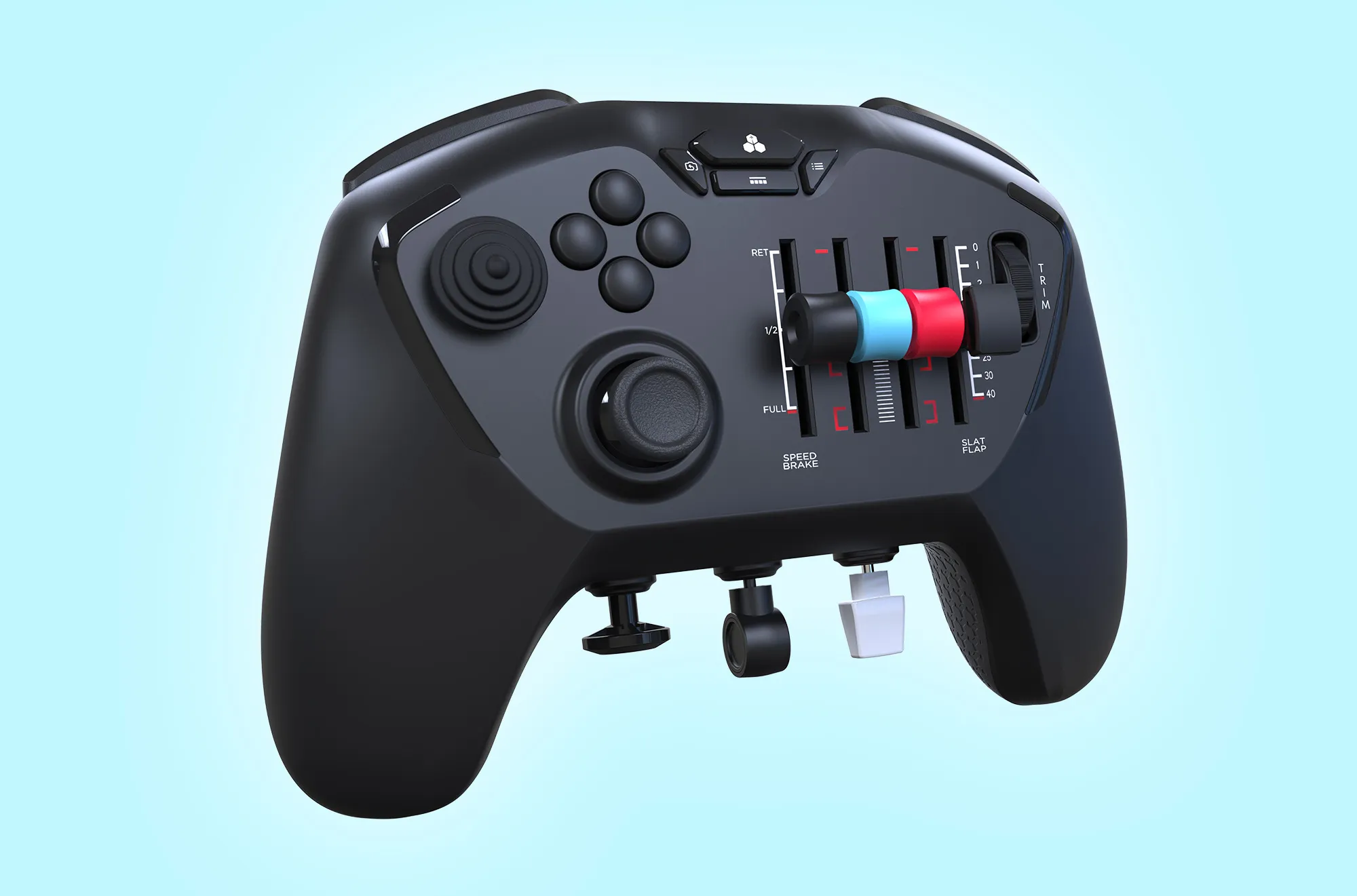
The Honeycomb Echo Aviation Controller aims to make that journey a little easier. Rather than requiring a collection of separate flight sticks, throttle controls and rudder pedals, it brings the essential functions together in a compact, handheld design. It’s an unusual-looking piece of kit, certainly, but its purpose is straightforward: deliver a more immersive flight-simulation experience without the expense, complexity and space requirements of a dedicated cockpit setup.
It’s an interesting idea, and one that could appeal to both newcomers and experienced virtual pilots. However, while the Echo has plenty going for it, there are a few compromises to consider before taking to the skies.
A Different Kind of Controller
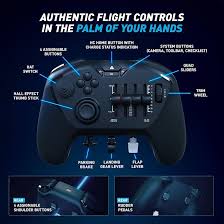
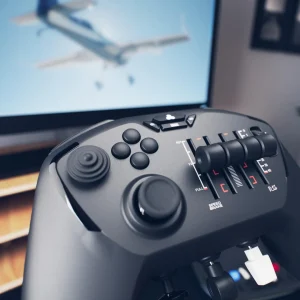
First impressions are certainly interesting. The Echo doesn’t resemble a conventional PC controller, and its cockpit-inspired layout makes it clear that this is hardware designed with a particular purpose in mind. Instead of a familiar arrangement of buttons and thumbsticks, you get a central flight-control stick, four sliders, dedicated switches, a trim wheel and integrated rudder controls.
There’s a lot happening here, and it can take a little while to understand how everything fits together. However, once you start thinking about the controls in terms of operating an aircraft rather than playing a traditional game, the design begins to make considerably more sense.
The biggest attraction is having so many important functions within reach. You can control pitch and roll, adjust your throttle, manage flaps, operate the landing gear and make trim adjustments without needing to spread your equipment across an entire desk. For anyone who wants to enjoy a flight without spending ages arranging hardware before every session, that convenience is a genuine selling point.
It also makes the Echo an appealing option for people who simply don’t have the room for a permanent flight-simulation setup. Its compact size means it can be picked up when needed and stored away afterwards, rather than becoming a fixture that dominates your gaming space.
Of course, cramming so many controls into one device inevitably involves compromises. The layout takes some getting used to, and the Echo won’t immediately feel intuitive to everyone. Nevertheless, its approach is refreshing, and there’s something to be said for a controller that tries to make specialist hardware more approachable rather than simply adding more complexity.
Taking Control of the Skies
The main thumbstick is one of the Echo’s most important features. Using 16-bit Hall-effect technology, it handles the primary pitch and roll inputs, with magnetic sensing helping to reduce the risk of stick drift associated with traditional contact-based components.
Precision is particularly important in flight simulation. Small movements can make the difference between maintaining a steady course and constantly correcting your aircraft, especially when approaching a runway or attempting to keep your plane level during a long journey.
The Hall-effect thumbstick provides a promising foundation for accurate control, although getting the sensitivity right is important. If the response feels too sharp, even a small movement can result in a larger adjustment than you intended. Spending some time fine-tuning the settings can help you find a more comfortable balance and make the aircraft feel considerably more predictable.
This initial adjustment period is worth bearing in mind, particularly for newcomers. The Echo may simplify the hardware side of flight simulation, but that doesn’t mean every aspect of learning to fly becomes effortless. There’s still a little work involved in finding the right settings and becoming familiar with the way your chosen aircraft responds.
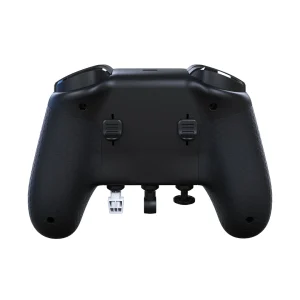
The integrated rudder controls are another welcome inclusion. Mechanically linked and using Hall-effect sensing, they provide rudder input without requiring separate foot pedals. That helps keep the setup compact while giving you another useful layer of control during turns and other manoeuvres.
For players with limited space, this is a sensible solution. Dedicated rudder pedals may offer a more specialised experience, but the Echo’s integrated approach makes the essential functions available in a single device. It is a practical compromise that fits the controller’s overall philosophy rather well.
Sliders, Switches and a More Hands-On Experience
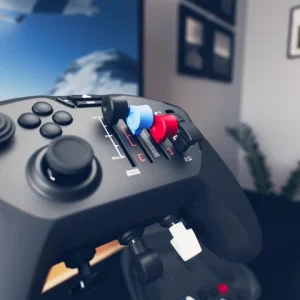
Where the Echo becomes particularly interesting is in its collection of additional controls. The four sliders can be assigned to functions such as throttle, flaps and speed brakes, giving you more direct access to adjustments that would otherwise require buttons or menu navigation.
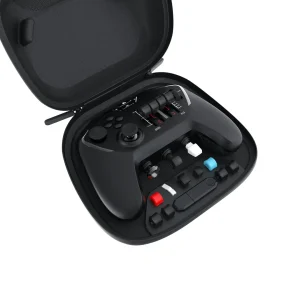
Interchangeable lever caps are included for general aviation and commercial aircraft, allowing the controller to be adapted to different flying styles. It’s a thoughtful touch that adds flexibility without making the whole process unnecessarily complicated.
The physical levers help give the Echo a more convincing flight-simulation feel. Rather than relying entirely on thumbstick movements, you can make deliberate adjustments using dedicated controls. This is especially useful when managing several functions throughout a flight, where having a clearly defined control for a particular task can make the experience feel more natural.
Dedicated switches for functions such as landing gear and the parking brake are equally useful, while the trim wheel provides a convenient way to make smaller adjustments to your aircraft’s pitch. Together, these features give the Echo considerably more character than a conventional controller adapted for flight simulation.
However, there is a learning curve. With several sliders, switches and other controls packed into a relatively small space, remembering which function does what can take time. The layout may seem logical once you’ve become accustomed to it, but during those early sessions, it’s easy to lose track of a control or reach for the wrong switch.
The camera controls could also be better positioned. Looking around the cockpit is an important part of flight simulation, whether you’re checking your surroundings or admiring the scenery, and the placement of the hat switch can make this less comfortable than it should be.
These aren’t reasons to dismiss the controller, but they do show that a compact design isn’t automatically a perfect one. A little more attention to control placement and accessibility could make the Echo even more enjoyable to use.
Getting Set Up and Ready to Fly
One of the biggest barriers to flight simulation is configuration. A dedicated controller can offer plenty of functionality, but if you need to spend hours assigning inputs and working out which buttons operate which aircraft systems, the excitement of getting airborne can quickly disappear.
Honeycomb has made a welcome effort to address this with downloadable profiles for Microsoft Flight Simulator 2024. These provide a starting point for general flying and several aircraft configurations, reducing the amount of manual setup required before you can begin.
For newcomers, this is particularly helpful. Having a profile to work from makes the controller less intimidating and gives you an opportunity to learn the layout without having to configure every input from scratch. Once you’re comfortable with the basics, you can adjust individual controls to suit your preferences.
It’s worth remembering that these profiles aren’t necessarily the final word. Different aircraft have different requirements, and personal preferences will vary. You may still need to make adjustments to sensitivity and control assignments to achieve the experience you want.
Documentation could also be more comprehensive. When using an unusual piece of hardware, clear instructions are invaluable, and additional guidance on setting up profiles and customising controls would make the learning process smoother. The Echo is designed to simplify flight simulation, so helping users understand its features should be an important part of the overall experience.
Compatibility is another consideration. The controller supports several established PC flight-simulation titles, but its design is primarily aimed at civilian flying. Players who prefer complex combat simulations or aircraft that demand a broader range of specialised inputs may find that a dedicated flight stick and throttle setup better suits their needs.
Comfort, Battery Life and Portability
Despite its unconventional appearance, the Echo has a comfortable, handheld design. It is thicker than a typical controller, but the shape is intended to accommodate its collection of flight controls without becoming excessively heavy. The build feels substantial enough for a piece of specialist hardware, and the physical sliders and switches help reinforce its purpose.
The included hard-shell carrying case is a particularly useful addition. With interchangeable lever caps, a wireless receiver and a charging cable to keep track of, having a dedicated place to store everything makes a difference. It also means the controller can be packed away safely when you’re finished flying.
Connectivity is flexible, with a 2.4GHz wireless dongle for cable-free use and a USB-C wired option. Wireless operation helps keep your gaming space tidy, while the wired connection offers an alternative when you prefer not to rely on the battery.
Honeycomb quotes up to 15 hours of battery life, which should be sufficient for several sessions before charging becomes necessary. The USB-C connection makes recharging straightforward, although it’s worth keeping an eye on the battery before settling down for a particularly long flight.
These practical touches strengthen the Echo’s appeal. It isn’t designed to be a permanent cockpit installation; it’s intended to provide a more involved flight experience whenever you fancy one. The combination of wireless connectivity, compact dimensions and a protective case makes that approach work particularly well.
Is It Worth the Investment?
The Honeycomb Echo Aviation Controller occupies an interesting position in the PC flight-simulation market. It offers more dedicated functionality than a conventional controller, but it doesn’t demand the space or complexity associated with a full flight-control setup.
That makes it particularly appealing to newcomers who want to explore the genre without immediately committing to a collection of specialist equipment. The integrated rudder controls, physical levers, trim wheel and dedicated switches provide a useful range of functions, while downloadable profiles help reduce the initial configuration burden.
For more experienced virtual pilots, the attraction is convenience. The Echo offers a compact alternative for those who want a more hands-on experience without permanently dedicating their desk to flight simulation. However, players who regularly tackle complex aircraft or more demanding simulations may find the layout restrictive.
Price is an important consideration, too. This is a specialist controller, so its value depends on how frequently you’ll use it and what you expect from your flying experience. If you only occasionally take to the skies, a conventional controller may be sufficient. If flight simulation is becoming a regular part of your PC gaming routine, the Echo’s combination of features and portability becomes much more compelling.
Pros
- Compact design combines essential flight controls in one device.
- Hall-effect thumbstick provides precise pitch and roll input.
- Integrated rudder controls remove the need for separate pedals.
- Four configurable sliders with interchangeable lever caps.
- Dedicated switches and trim wheel improve accessibility.
- Downloadable profiles help simplify initial setup.
- Wireless and USB-C wired connectivity.
- Protective hard-shell carrying case included.
- Up to 15 hours of quoted battery life.
Cons
- Unusual layout takes time to learn.
- Camera controls could be more conveniently positioned.
- Sensitivity adjustments may require patience.
- Documentation could provide clearer setup guidance.
- Compact layout won’t suit every aircraft or simulation style.
- Less suited to players who need a full range of specialised flight controls.
Final Thoughts
The Honeycomb Echo Aviation Controller is a genuinely clever piece of PC gaming hardware, and one I’d happily recommend to anyone who regularly enjoys civilian flight simulation but doesn’t want to invest in a full cockpit setup. By bringing a Hall-effect thumbstick, rudder controls, adjustable levers, dedicated switches and a trim wheel together in one compact device, Honeycomb has created an accessible alternative that makes flying more hands-on without taking over your desk.
It’s not perfect. The unusual layout takes time to master, the camera controls could be better positioned, and getting sensitivity settings just right can involve some trial and error. Those frustrations are worth acknowledging, but they don’t undermine what the Echo does well. Once you’re familiar with the controls, the convenience of having so many essential functions at your fingertips is hard to ignore.
If Microsoft Flight Simulator and civilian aviation are your main interests, the Echo Aviation Controller is a worthwhile investment and an excellent step up from a conventional controller. Its combination of portability, dedicated controls and straightforward profile support makes it particularly appealing to newcomers and experienced virtual pilots who want a simpler setup.
However, if you primarily fly complex combat aircraft or demand the extensive control options of a dedicated flight-simulation rig, I’d look elsewhere. The Echo has a clear audience, and for that audience, it delivers where it matters most.
Ultimately, this is a controller with a genuine purpose rather than a gimmick. It makes flight simulation more accessible, keeps your setup manageable and gives you a more engaging way to take to the skies. For PC pilots looking for a compact, dedicated flight controller, the Honeycomb Echo Aviation Controller earns a firm recommendation.